Removing OpenVPN from the Mullvad VPN app
In version 2025.14 of the desktop app, we removed the ability to select OpenVPN as a tunnel protocol.
We announced the decision to retire OpenVPN last year, continuing our adoption of WireGuard that started in 2017. OpenVPN has provided a valuable anti-censorship alternative for many users, but with more WireGuard anti-censorship methods available in the app WireGuard now provides the same level of obfuscation with superior security and performance.
How to migrate to WireGuard
The transition to WireGuard will happen automatically and will not require any further action. If you had previously selected OpenVPN as the VPN protocol to use, it will automatically transition to WireGuard.
Below are some potential issues that might occur if you had OpenVPN selected:
Location
If you had previously selected a specific OpenVPN server, or a location / custom list containing only OpenVPN servers, your internet connection may be blocked until a new location is selected. You may need to choose a different location as OpenVPN servers are no longer available.
Note that OpenVPN servers will no longer show up in custom lists.
Anti-censorship
In some cases, OpenVPN has been able to bypass firewalls and censorship where WireGuard could not. To restore similar functionality, go to:
“Settings” -> “VPN Settings” -> “Anti-censorship”
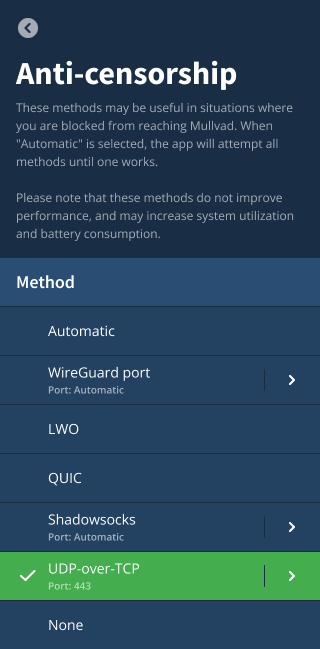
- To mimic OpenVPN over TCP, select “UDP-over-TCP” and set port to 443.
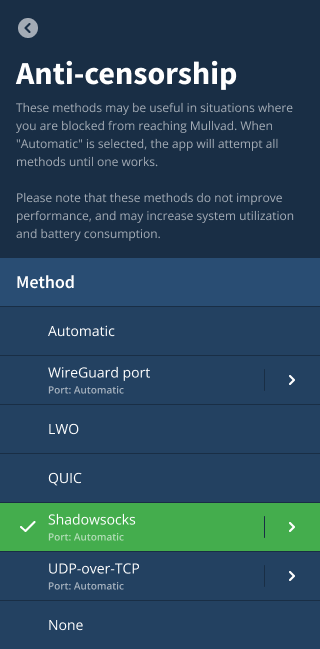
- To mimic OpenVPN with Bridge mode, select “Shadowsocks”.
Selecting either of these anti-censorship methods will wrap the WireGuard traffic in an additional layer of obfuscation that resembles the OpenVPN protocol.
The default option, “Automatic”, will try to select an appropriate method on your behalf when plain WireGuard fails to connect. Manually selecting another option can reduce the time it takes to connect by using the specified option immediately.
Be aware that enabling any anti-censorship method does not improve your privacy. If you are in a situation where you can use our service without obfuscating your traffic, there is no need to change any obfuscation settings. Enabling “UDP-over-TCP”, “ShadowSocks” or "QUIC" can have a detrimental impact to the performance and resource consumption of your device.
MSSfix
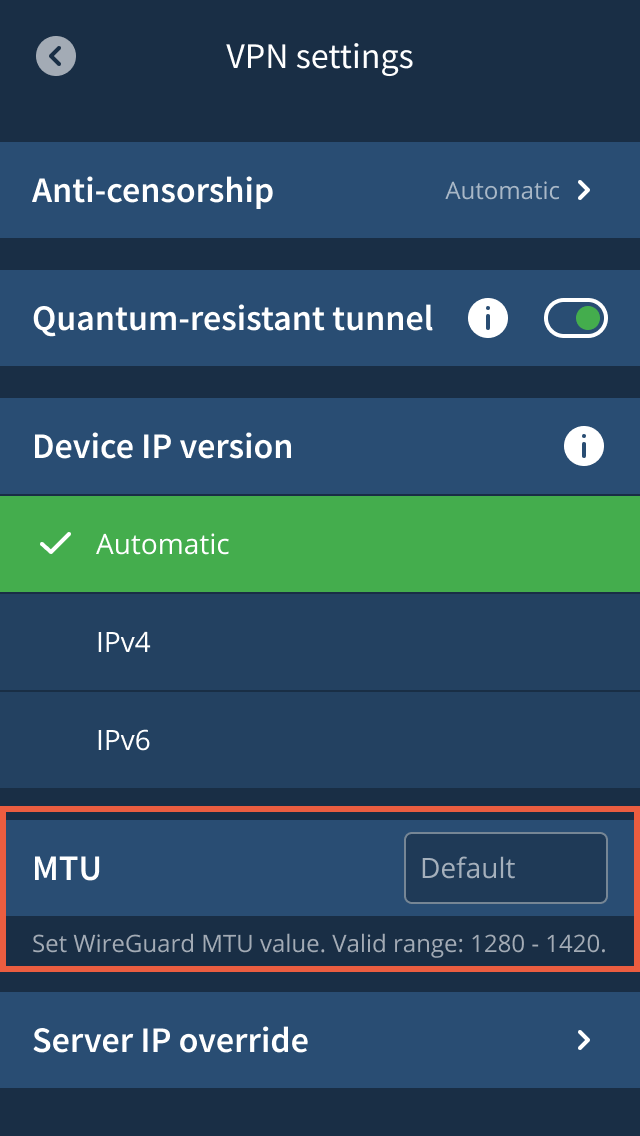
If you previously used the OpenVPN “Mssfix” option to limit packet size, consider adjusting the WireGuard “MTU” setting accordingly. Go to “Settings” -> “VPN Settings” and scroll to the bottom to find it.
External VPN apps and routers
If you have configured an external app or router to connect to Mullvad OpenVPN servers, then it will stop working on or before 15th January 2026 when the last servers will be taken down. The option to generate new OpenVPN configurations from your account page may cease to exist before then.