Mullvad Browser 16.0
Mullvad Browser 16.0 is our first release based on Firefox ESR 153, which incorporates a year's worth of changes.
What's new?
Transition to the latest Firefox ESR
As with every year, when Firefox ESR transitions to a new version (this time based on the code introduced between Firefox 115 and Firefox ESR 153), an audit is conducted of the many changes that could adversely affect users' privacy and security.
Redesigned Settings
Mullvad Browser 16.0 introduces a complete redesign of the Settings experience based on a parallel redesign shipped with Firefox in June. Improvements include a cleaner layout, updated navigation, and clearer labels and descriptions aimed at making settings more straightforward to find, understand, and manage.
Generic window titles
Another new addition to Settings is the option to use generic window titles, which can be found under:
Settings → Privacy and security → Connection and software security → Advanced settings → Protections from third-party applications.
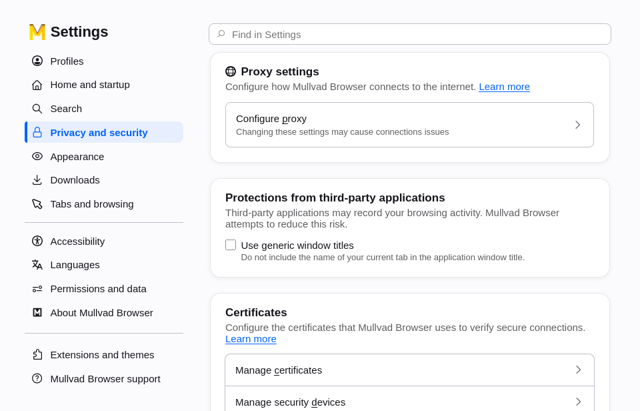
Like most browsers, Mullvad Browser uses the title of the page you're currently viewing for the names of its windows. However, other applications on your computer or the operating system itself can read these titles without special permissions.
When enabled, this option simply replaces all window titles with "Mullvad Browser", preventing other software from snooping on your browsing history.
For now, this option is strictly opt-in, as there was not sufficient time during this release cycle to properly evaluate potential side-effects for users. In particular, enabling this setting may reduce the browser's usability for those who rely on accessibility tools (e.g. screen-readers) or those with highly customized systems (e.g. less-popular desktop managers, application switchers, etc).
If you are one of these users, try using this setting, and report back any bugs or usability issues you find by email to support@mullvadvpn.net
Clearing the current browsing session
Since the first release of Mullvad Browser, we inherited the New Identity broom 🧹button, which could be used to clear the current browsing session.
This icon has now been replace by the Clear Private Session flame 🔥 button, which was introduced by Firefox to Private Browsing Mode and has the same behavior.
Quad9 as default encrypted DNS
Users of Mullvad’s now discontinued Encrypted DNS service (DoH, DoT) will automatically be migrated to Quad9.
If you have customized your DoH settings, we will not change them. If you have manually configured a variant of the Mullvad Encrypted DNS (base, extended, family. etc.), please ensure it is reverted to the default option.
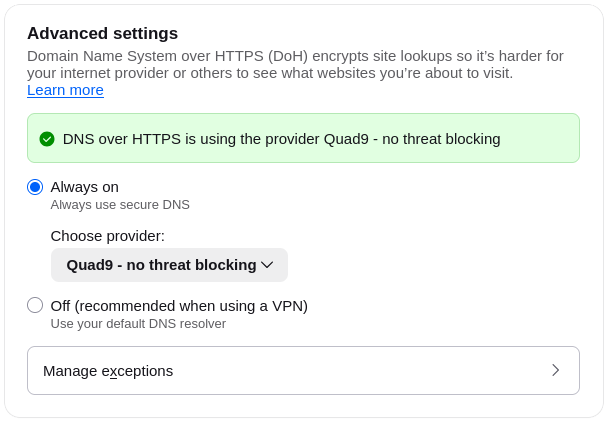
At the same time, we have simplified the encrypted DNS settings to either always use DoH or use the default operating system DNS, which we recommend when using a VPN.
Linux on ARM
Finally, after a year of testing, Mullvad Browser 16.0 now features native support for Linux computers with 64-bit ARM (AArch64) processors, such as Raspberry Pis and Apple Silicon Macs running Linux.
If you have been relying on Mullvad Browser Alpha for support for these devices, we recommend switching over to the stable release channel.
You can download it manually via our website or install it directly using our RPM and DEB repositories.